

Apple has officially released iOS 27 Beta 4 for developers, bringing another round of refinements ahead of the stable release expected later this year. While this update doesn’t introduce major new features, it focuses on improving the overall user experience with several quality-of-life enhancements across Siri, AirPods, Apple TV, Photos, Camera, and Wi-Fi settings.
The latest beta arrives shortly after the release of the iOS 27 Public Beta, giving developers early access to features that will eventually make their way to all compatible iPhones.


Siri Gets More Polished
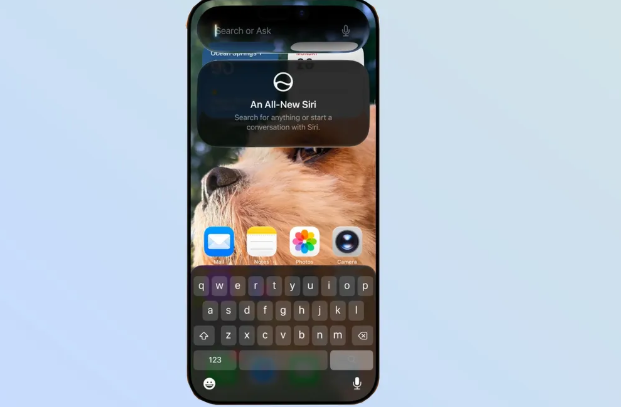
One of the biggest changes in iOS 27 Beta 4 is an improved Siri experience. Apple has introduced a new splash screen that appears the first time users activate Siri from the Home Screen or Dynamic Island. The new screen briefly explains the redesigned Siri experience and helps users understand its latest AI-powered capabilities.
Apple has also fixed the Recent Apps menu issue where app shortcuts previously appeared grayed out.
Another welcome addition is expanded support for Siri’s Expressive Voice feature. Users can now choose from several new English-language voices and accents. Although advanced customization options such as speech pace and expressiveness remain limited to the original two American voices, Apple continues to expand the feature with every beta release.
Siri Settings now also include a new option that lets users adjust how many preview lines Siri displays, with settings ranging from zero to five lines.
AirPods Controls Become More Convenient
iOS 27 Beta 4 adds support for the Adaptive Audio slider directly inside Control Center. Users with AirPods Pro 2, AirPods Pro 3, and AirPods 4 can now quickly adjust the balance between Active Noise Cancellation and Transparency Mode without opening the AirPods settings page.
This makes switching listening modes much faster during daily use.
Apple TV Automatically Downloads Upcoming Episodes
Apple has introduced a useful offline viewing feature for Apple TV users.
A new Automatic Downloads option allows the Apple TV app to automatically download the next two episodes of shows in your “Continue Watching” list. Once watched, older downloaded episodes are automatically removed to free up storage.
Users can enable this feature by navigating to:
Settings → Apps → TV → Automatic Downloads
The feature is especially useful for travelers or anyone who frequently watches content without an internet connection.
Photos, Camera and Wi-Fi Improvements
Apple has also added several smaller but useful improvements throughout the system.
The Photos app now includes a Zoom Photos to Fill toggle that automatically fits images to match the display’s aspect ratio.
For professional users, the Camera app introduces a new ProRes Log Format option whenever ProRes recording is enabled.
Meanwhile, Wi-Fi settings now allow users to disable Connectivity Assist for individual Wi-Fi networks, providing greater control over network behavior.
Wallpaper Preview Removed
One feature that quietly disappeared in Beta 4 is the wallpaper preview shown in Notification Center. Previously, users could briefly see a cutout of their wallpaper subject while pulling down notifications.
Apple hasn’t explained why the feature was removed, but it is widely believed to have been an unintended visual effect rather than a planned feature.
iOS 27 Beta 4 Highlights
- New Siri introduction screen
- More English voices and accents for Siri
- Adjustable Siri preview length
- Recent Apps menu bug fixed
- AirPods Adaptive Audio slider added to Control Center
- Apple TV automatic episode downloads
- Zoom Photos to Fill option in Photos
- New ProRes Log recording format
- Per-network Connectivity Assist controls
- Wallpaper preview removed from Notification Center
Final Thoughts
Although iOS 27 Beta 4 is a relatively small update, it delivers several meaningful refinements that improve day-to-day usability. Apple continues polishing Siri, expanding AirPods controls, and adding practical features across the operating system as it prepares for the official public rollout later this year.
If you’re already testing iOS 27, Beta 4 offers a smoother experience with useful enhancements that make the platform feel more complete.
What do you think about the latest iOS 27 Beta 4 update? Let us know your favorite new feature in the comments below.
Discover more from Passionategeekz
Subscribe to get the latest posts sent to your email.

0 Comments